
Where to put a mesh node or extender: how to find the spot
The most common mistake with a mesh node or an extender is putting it in the room that has no signal. It belongs where the signal is still good, and you can find that spot with your phone in a few minutes.
In short
- A wireless node can only pass on the signal it receives. Put it where the router's signal is still good, usually halfway to the weak area, not in the weak room.
- As a rule of thumb, look for a spot where your phone reads the router at around -60 to -67 dBm. Most mesh apps also show the quality of the link between units.
- Check two things afterwards: the weak room now gets a good signal, and the path between units you walk along has no gap.
- With a cable to the node, the rules change: it can go right next to the weak area.
On this page
When people buy a mesh system or an extender for the bedroom with no signal, the obvious thing is to plug it in the bedroom. It's also the spot where it works worst. A wireless node has two links: one to your devices and one back to the router. If it sits where the router barely reaches, the second link is weak, and everything your devices send and receive has to squeeze through it.
The spot you want is somewhere in between: close enough to the router to receive it well, close enough to the weak area to cover it.
Find the spot with your phone
You need a way to read the signal in dBm. On an iPhone, Apple's free AirPort Utility does it; how to check Wi-Fi signal strength on iPhone explains how to turn it on. On a Mac, Option-click the Wi-Fi icon; on Android, a Wi-Fi analyser app.
Then walk from the router toward the weak area, stopping every few metres to read the router's signal. You'll see the value fall gradually, and then usually drop faster at a wall, a floor or a doorway. A good place for the node is the last spot where the router still reads at around -60 to -67 dBm, ideally just before the big drop. There's nothing magic about these numbers, but at that level the link between the node and the router is solid, and the node still sits close enough to the weak area to cover it.
Then plug in the node and use your mesh app. Most apps show the quality of the link between each unit and the router, often as a colour or a word. If it says the connection is weak, move the node one step closer to the router and check again.
Manufacturers set outer limits too. eero, for example, recommends keeping wireless units no more than about 15 metres (50 feet) apart, and walls shorten that distance a lot.
Check the result where it matters
Once the node is in place, check two things.
The weak room. Take a reading where you actually use it: the bed, the desk. It should now be well above -70 dBm. If it isn't, the node may be too close to the router, or a heavy wall sits between the node and the room; move the node a little further along the path, as long as its link to the router stays good.
The path between the units. Walk from the router's area to the node's area with your phone, as you would with a call running. Phones switch from one unit to the other only when the signal from the first drops quite low, below -70 dBm on an iPhone according to Apple. If there's a stretch where neither unit is good, that's where calls will drop. Phone won't switch to the nearest node explains the rules and how to fix a gap.
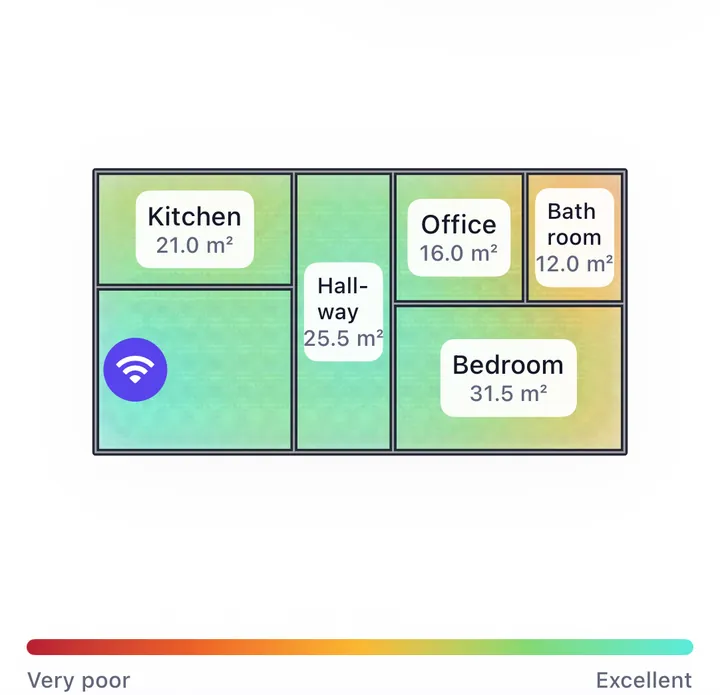
In this demo house, the hallway scored 53 with the router alone: fair, right where the connection started to fail. The node went there rather than into the far rooms that were already poor. The bedroom rose from 24 to 70 and the office from 22 to 71. The bathroom in the far corner only reached 45; moving the node a little further toward it would help that room, as long as the node still receives the router well.
Practical details that change the result
Height and openness count here too. A node on the floor behind the sofa loses much of what a node on a shelf would get. Keep it in the open, away from the TV, mirrors, fridges and metal shelving, just like the router.
On two floors, the landing is often ideal. It receives the router through the stairwell and covers the rooms around it. See Wi-Fi weak upstairs.
Basements and gardens follow the same rule. For a basement, the top of the basement stairs; for the garden, the room closest to the garden that still has good signal, near a door or window. See Wi-Fi in the garden.
Sockets are the usual constraint. If the ideal spot has no socket, a short extension cord is better than a worse position. Plug-in extenders are the hardest to place well for exactly this reason.
With a cable, it's different
If you can run an Ethernet cable to the node, its link to the router no longer depends on the air. Then the best place is close to the weak area itself, or in the middle of the floor it needs to cover, since all of its radio can go to your devices. Most mesh systems support a cable between units, often called wired or Ethernet backhaul, and it's the most reliable way to set them up.